
A CRM is an important tool for any company or business; however, companies often make the mistake of choosing a WhatsApp CRM to solve a problem already addressed by one of WhatsApp Business’s official tools. Below, I outline the main “wrong” reasons companies adopt a WhatsApp CRM, while highlighting the key solutions (both free and paid) that WhatsApp itself offers for each scenario:
To avoid WhatsApp Business penalties for spam
This is a common myth around many CRMs; however, WhatsApp Business (or Meta) rules apply to all users, whether they use a CRM or not. For instance, if a user reports us for spam after we initiate the conversation, WhatsApp will likely uphold the report and may penalize our account. Similarly, if we send multiple messages to a user (without receiving a prior response) and they block and report us for spam, WhatsApp will likely uphold that report and penalize our account (regardless of whether we use a CRM). In such cases, WhatsApp does not penalize the CRM provider; it penalizes the business’s WhatsApp Business account directly.
To illustrate, consider an accountant: If a company fails to file its taxes or makes a tax-related error, it cannot blame the accountant, because the company bears direct responsibility for the violation. Consequently, the company—not the accountant—receives the penalty or fine.
You want to send a private “group” message to a list of 1,000 contacts
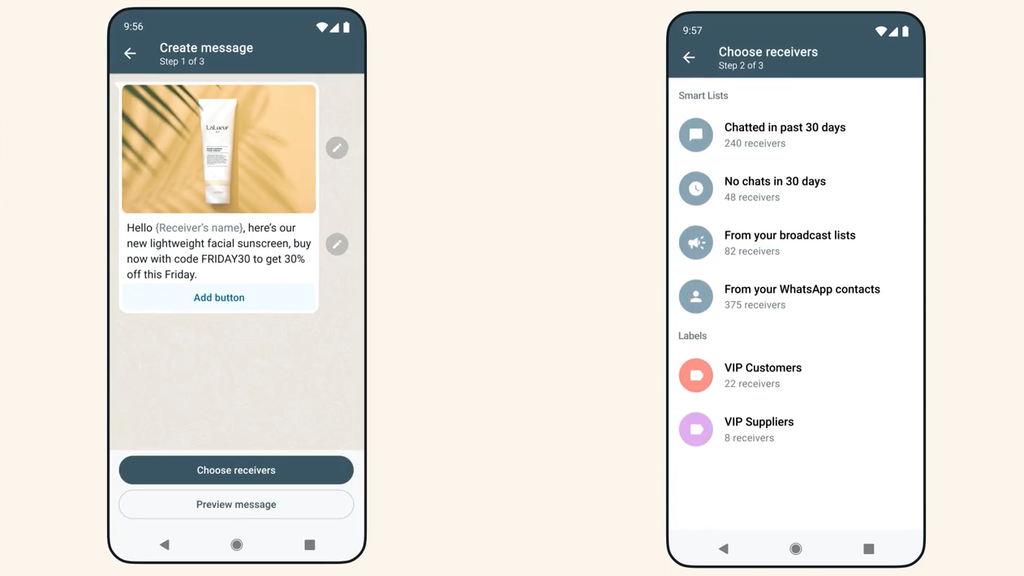
WhatsApp Business offers a tool called “broadcast lists,” which lets you send a group message to everyone who has saved your number as a contact. A broadcast list is limited to 256 contacts and should be used judiciously; sending multiple messages in quick succession could lead to spam reports.
In this scenario, if you wish to rely solely on free WhatsApp Business features, you could send four group messages (each addressed to a list of 256 contacts), provided you allow enough time between them to avoid being perceived as a spammer or misusing the tool. For instance, you could send these four messages at a rate of one per week, reaching all 1,000 people gradually. Another approach (or a complementary method) is to post a status update (WhatsApp Story) with the information you want to share; interested contacts can then reach out via private message by replying to or commenting on the story.
For paid solutions, the first option is WhatsApp Business’s “paid templates,” which let you send private messages to an unlimited number of contacts using a pre-defined message template. You can converse with anyone who replies to these messages, provided the response occurs within 24 hours (exceeding this timeframe incurs an additional cost per message).
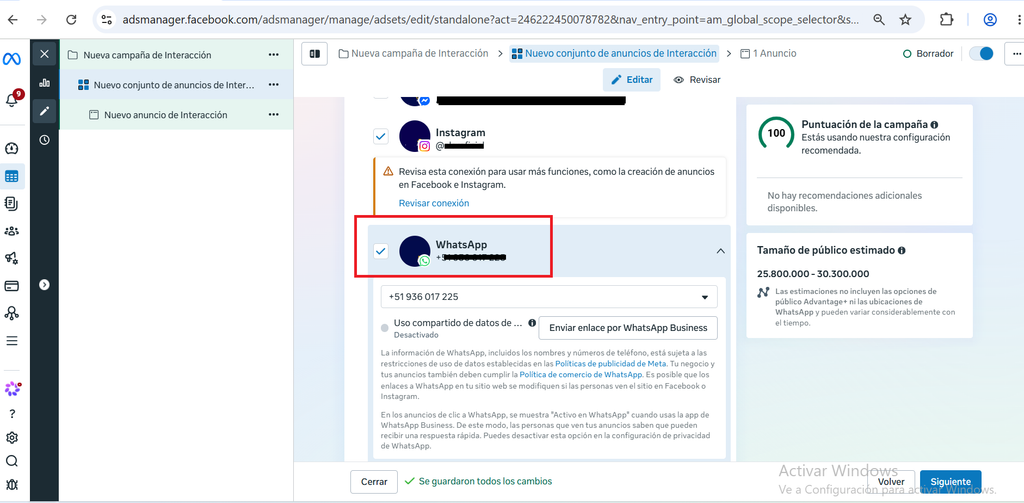
Another paid solution for this scenario is Meta Ads (using the WhatsApp private message objective), which can be shown to a specific contact list—such as email addresses or phone numbers—using a “Custom Audience.” Ads will appear on Facebook, Instagram, Threads, and WhatsApp (in status updates); when a user clicks on an ad, they will be directed to our WhatsApp Business account.
Multiple people need to manage the same WhatsApp Business account
The WhatsApp Business tool allows up to three devices or browsers to connect using the Web version. In this scenario, if we want to use only the free features of WhatsApp Business, we can have three different people connect via a web browser while a fourth person connects on the primary mobile phone (via the mobile app). The web version has some limitations compared to the mobile version: for instance, you cannot view older chats; you can only post status updates (Stories) as images or videos (up to 10 MB), and you don’t have access to broadcast lists or the ability to add contacts. If you don’t use the primary phone for more than 14 days, all linked devices will automatically disconnect for security reasons.
Another free solution is to link your WhatsApp Business account to your Facebook Page. This allows all Facebook Page administrators to view and reply to WhatsApp messages, though there are limitations compared to the web version—such as the inability to send voice notes, post status updates, or view Stories (if a user replies to a Story, the Story itself cannot be viewed). Essentially, the tool is limited to simply replying to messages.
For paid solutions, Meta Verified (the blue checkmark) offers plans that increase the number of linked devices or browsers (up to 10 users) and add features like identifying which agent or device sent a specific message.
If you need more than 10 people to handle WhatsApp inquiries, Meta offers the WhatsApp Cloud API (direct access), which lets you connect directly to the WhatsApp API. However, the WhatsApp API provides only the following functions:
• Sending and receiving messages.
• Webhooks (automated notifications whenever a significant event occurs).
• Templates.
• Basic statistics.
This solution does not include a multi-agent user interface. In this case, the client must build their own inbox (or hire someone to build it). On this platform, costs are incurred for sending WhatsApp “message templates” and for individual messages (resulting from those templates) sent after the 24-hour window has closed.
WhatsApp CRMs
A WhatsApp CRM simply provides a more user-friendly inbox interface for the WhatsApp Cloud API. In addition to the CRM cost, you must also pay the WhatsApp Cloud API fees (for message templates or individual messages sent after the 24-hour window). As you can see, a WhatsApp CRM must follow the same rules as WhatsApp Business. However, a major issue with WhatsApp CRMs is that they are developed by “private” or “third-party” companies—known as Business Solution Providers (BSPs)—independent of Meta. Virtually any individual or company can adopt this designation, leading to significant variations in platform quality and support across providers.
The Early Days of Facebook Ads and Fan Acquisition
Interestingly, the current situation regarding WhatsApp CRMs mirrors what happened 15 years ago with Facebook fan services. Around 2010–2011, Meta’s advertising platform (Facebook Ads) was in its infancy; while it offered an ad format designed to gain followers (fans), numerous third-party companies began selling them. Their sales pitch questioned why businesses should pay Facebook directly. The catch, however, was that these third parties often sold fake accounts of questionable repute. Furthermore, these services were frequently more expensive than Facebook’s own ads for gaining followers—ads that actually guaranteed a certain level of quality.
As history tends to repeat itself, it is wise to check for “official” services (whether free or paid) offered directly by Meta or WhatsApp before hiring an external WhatsApp CRM provider. Official services generally offer higher quality because the company that created or owns WhatsApp—in this case, Meta —develops them.
What are your thoughts on these WhatsApp Business solutions? Do you use any of them in your company or business?
If you need assistance with WhatsApp Business for your company, you can contact me by visiting the following link.
Top image by Jakub Żerdzicki via Unsplash.com under a Creative Commons license.